

Not just analytics, the database. Your agent’s conversations, structured, kept, and queryable by you or readable by the client who paid for it.
Analytics for your AI agents, and for your clients.
AgentSight is where your agent’s conversations live, every message, tool call and model call, kept as data you can query. Then it hands that data to your client: as a dashboard on your own subdomain, embedded in your product, or through the API so you can draw it inside your own UI.
Store
- conversations
- 4,116
- messages
- 128,402
- tool & task calls
- 31,884
- llm calls
- 47,201
- raw otel spans
- 212,940
Kept as structured data, not as a rendered report.
In
- Python SDKconversations, turns, messages
- Auto-captureevery LLM call, any provider
- Decoratorstools and tasks, timed
- REST · importyour existing history
Out, and who opens it
- Dashboardyou and your client
- yourclient.agentsight.ioyour client, your brand
- Embedyour client, inside your product
- Query APIyou, render it yourself
Developer observability tools were built for you, not for the person who paid for the agent.
You built the agent. Your client has no idea whether it’s working.
So every month you screenshot metrics into a slide deck, a manual ritual that tells nobody anything about the days in between.
Neither do you, not until they complain. And when the message finally arrives, “the bot has felt off lately”, there is no conversation attached to it, no date, and nothing you can reproduce.
How it arrives today
“The bot has felt off lately.”
- no conversation
- no date
- no reproduction
With AgentSight
Agent loses context after escalation handoff|
“The bot has felt off lately.”
The hard part was never watching the metrics move. It is turning what your client tells you into a better answer next time.
From conversation, to complaint, to fixed.
- 01
Instrument
- Python SDK
- Auto-capture
- REST API
- JSON import
- 02
Present
- White-label subdomain
- Embedded dashboard
- Viewer role
- Field-level flags
- 03
Analyse
- 5 KPI cards, 11 charts
- Full transcripts
- Cost & token usage
- PDF reports
- 04
Act
- Feedback
- Tickets
- Discussion
- Resolution
Step 4 feeds back into step 1: you ship the fix, and the loop begins again.
Verify before you send: AGENTSIGHT_FILE_EXPORTER writes spans to a directory instead of transmitting them.
Six lines. Your agent unchanged.
init(), then a conversation and a turn. Everything inside, tool calls, model calls, token counts, cost, latency, is captured without being mentioned.
A model call records the accounting only: token counts, model ids and timings. What reaches a transcript is what you record yourself, and field flags decide what a client sees of it.
Read the developer guideimport agentsight
agentsight.init()
with agentsight.conversation("wa-3859"):
with agentsight.turn():
agentsight.user_message("Where is my order?")
response = agent.run(…) # unchanged
agentsight.agent_message(str(response))
OpenAI and Anthropic calls are patched directly. LangChain and LlamaIndex catch whatever they route through. Anything else, Gemini, Bedrock, Vertex, a self-hosted model, is covered through wrap() or a framework integration. Including the evaluator, router and classifier calls nobody hand-tracks, which is usually where surprising cost hides.
The same store feeds every surface below: a dashboard, an embed, a subdomain, the API. What a client sees of it is a decision you make, not a default you inherit.
We are your agent’s database, and the one your client gets to open.
Every conversation your agent has is kept as structured data, messages in order, the tools and model calls that produced each answer, timings, tokens and cost. Query it yourself over a REST API, no lock-in and no export ticket, or hand it to your client as a dashboard, an embed, or their own branded subdomain.
GET /api/token-usage/summary/?group_by=day{ "group_by": "day", "currency": "USD", "results": [ { "group": "2026-08-24", "total_tokens": 34160, "calls": 14, "cost_usd": "0.53200000" }, { "group": "2026-08-25", "total_tokens": 46360, "calls": 19, "cost_usd": "0.72200000" }, { "group": "2026-08-26", "total_tokens": 36600, "calls": 15, "cost_usd": "0.57000000" }, { "group": "2026-08-27", "total_tokens": 53680, "calls": 22, "cost_usd": "0.83600000" }, { "group": "2026-08-28", "total_tokens": 43920, "calls": 18, "cost_usd": "0.68400000" }, { "group": "2026-08-29", "total_tokens": 58560, "calls": 24, "cost_usd": "0.91200000" }, { "group": "2026-08-30", "total_tokens": 39040, "calls": 16, "cost_usd": "0.60800000" } ]}Your client never has to leave your product.
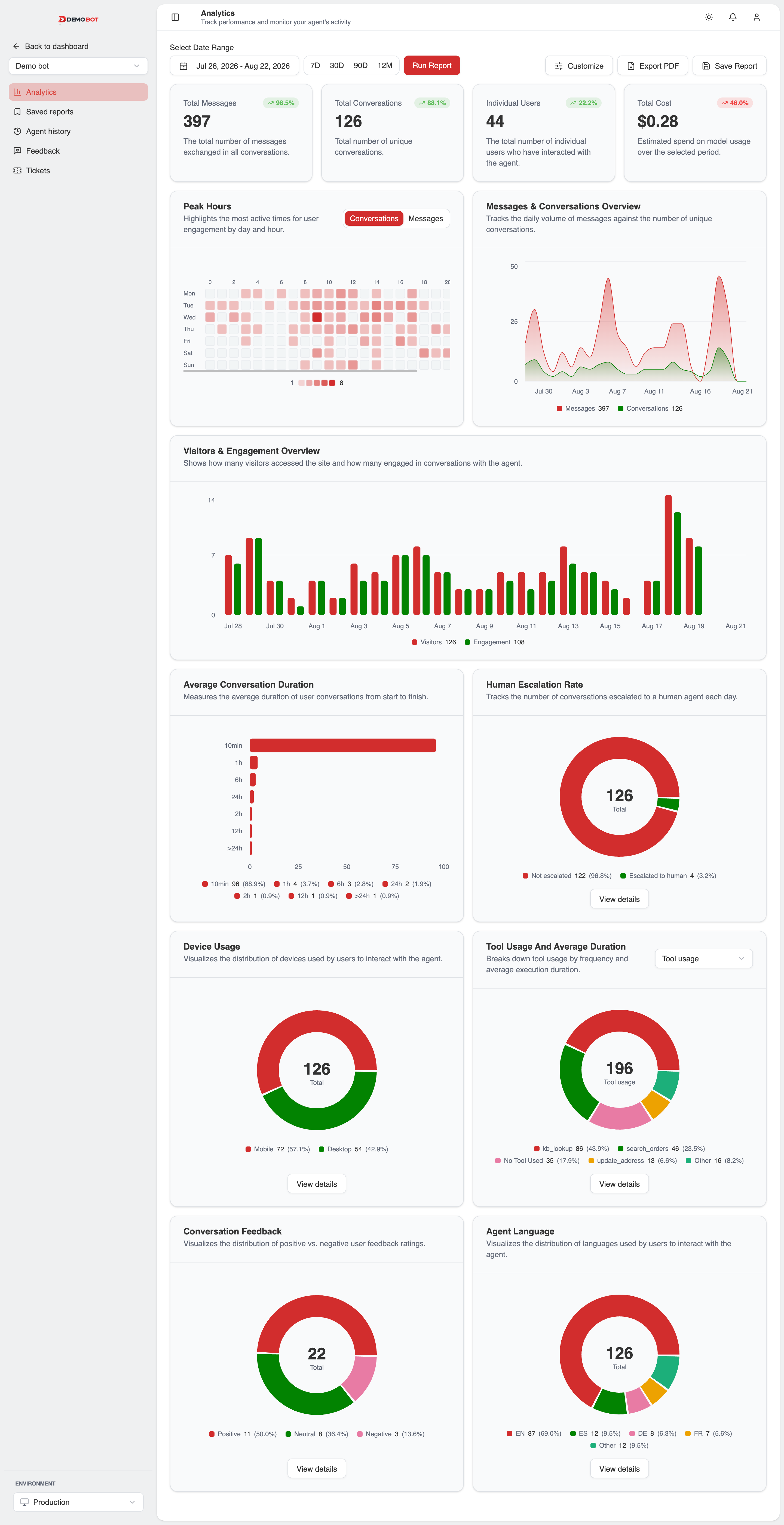
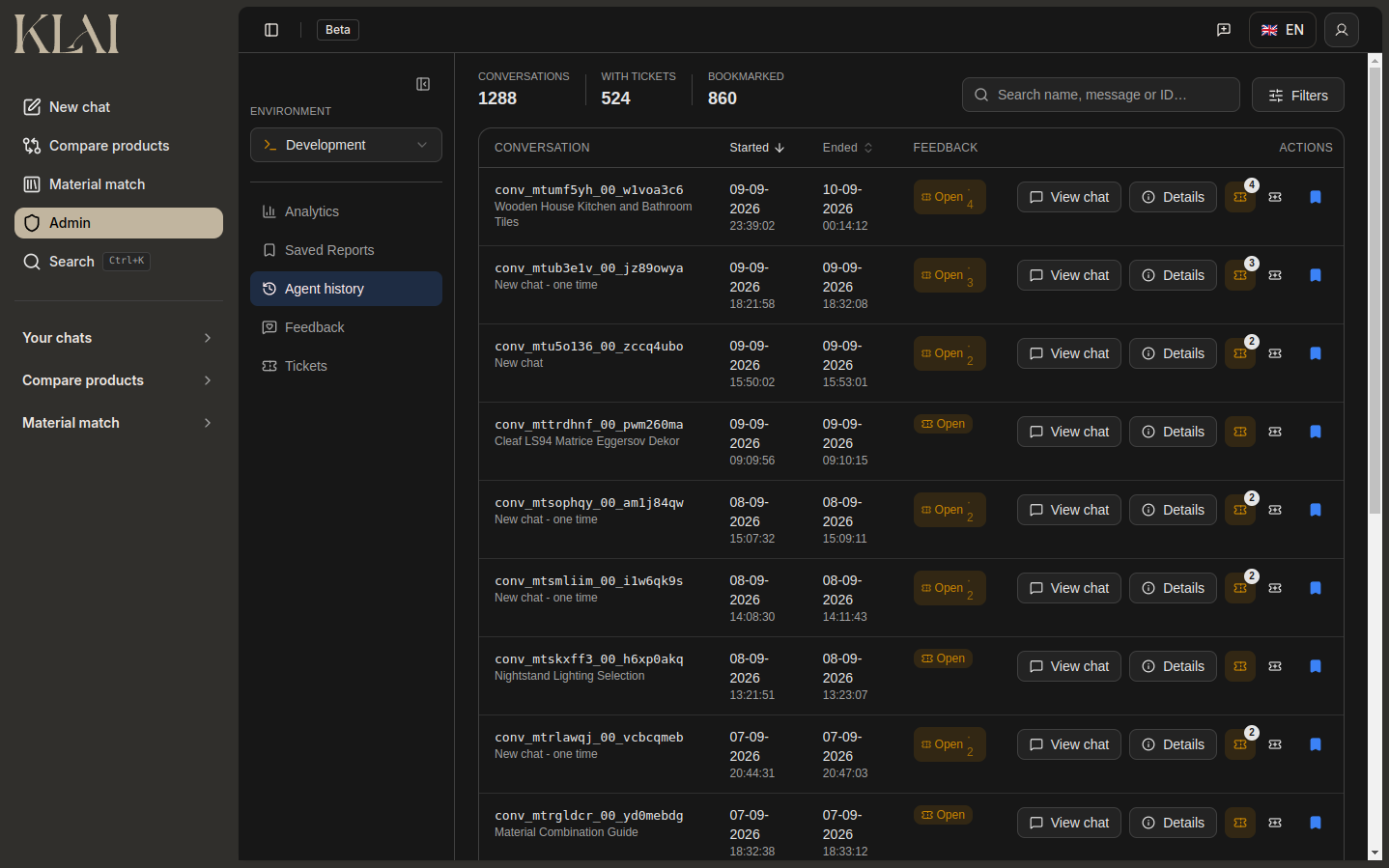
One dashboard, as many brands as you have clients.
Separate light and dark logos, separate light and dark primary colours, and eight chart slots set per theme, the first follows the brand primary, the other seven are yours to recolour. Your client sees only their own data.
Edit any swatch, both themes are set independently.
Slot 1 tracks the primary colour.
Slot 1 tracks the primary colour.
The monthly report writes itself.
Save a dashboard snapshot as a named report with its date range and metrics intact, then export a PDF from a per-agent template. Every card and chart earns a page, KPIs, trends, cost, engagement, with sentences that fill themselves in from that period’s own numbers. The deliverable that used to be a hand-built slide deck, generated instead of assembled.
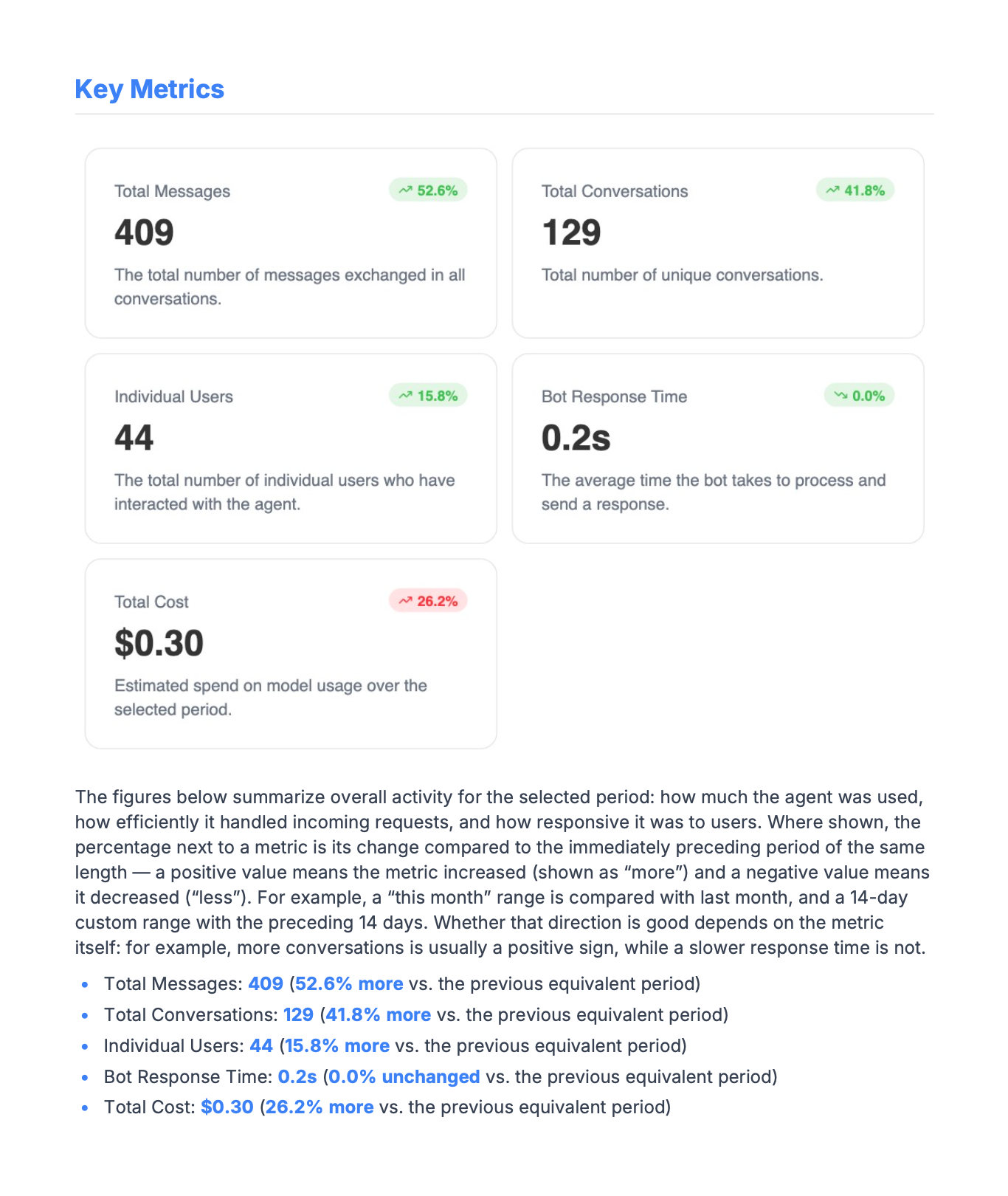
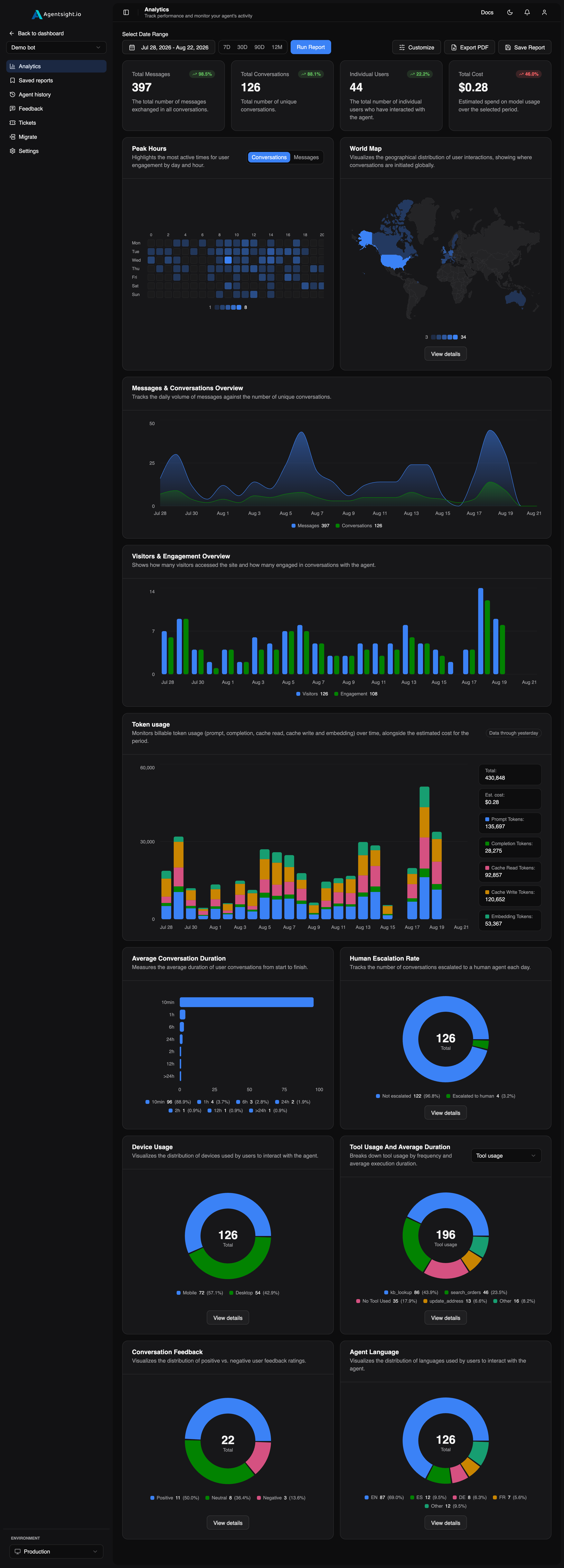
Five KPI cards and eleven charts, with exactly where each value comes from listed on the analytics page.
Every card and chart, on one dashboard.
Drag-and-drop layout, filtered by date range and environment, free on every plan. The raw OpenTelemetry spans underneath are kept and readable over the REST API, exact parent/child structure, per-call durations, tool arguments and responses. Analytics cover production only, so your development traffic never lands in your client’s report.
Read the thread bottom to top and you have the entire incident: what broke, why, what shipped, and who confirmed it.
Agent loses context after escalation handoff|
“The bot has felt off lately.”
Client flagged it happened twice more this week, always right after a transfer.
Found it, the summarizer was firing before transfer context got appended. Fix is up in staging.
They confirmed the next three sessions looked clean.
|
Now it’s a ticket, tied to the exchange.
Your client’s complaint used to be a Slack message saying the bot felt off lately. Now it is a ticket, linked to the conversation, with a priority and a thread.
- Anchored toone exchange
- Promoted fromfeedback
- Roles labelleddev / reporter
- Reachable from3 surfaces
Every card here is a shipped page, not a promise, click through for the exact inventory.
Everything, in one place.
Analytics
5 KPI cards, 11 charts.
Drag-and-drop, filtered by date range and environment, free, with no card required.
Learn moreTickets
Now it's a ticket, tied to the exchange.
Anchored to the conversation, the feedback, or the query it's about, with a priority, tags and a threaded discussion.
Learn moreTranscripts
Every message, in order.
Tool calls, durations and errors alongside what the human actually typed.
Learn moreWhite-label
Their name on it.
Your client's subdomain, logo and colours, in light and dark.
Learn moreEmbed
Inside your product.
A scoped token and an isolated origin, personal data off by default.
Learn moreReports
PDF, from a snapshot.
A named report with its date range frozen, exported from a per-agent template.
Learn moreListed here so you know where this is going. None of it is live yet, nothing on this page depends on it.
Your agents, analysed by ours.
Not yet shippedReading every conversation does not scale, and the ones worth reading are the ones you would never think to open. We are building a layer that reviews them for you, scoring conversation quality, flagging the exchanges that went wrong, and drafting the ticket with the conversation already attached.
- Conversation quality scoringplanned
- Failure and root-cause clusteringplanned
- Anomaly detection on cost, latency, escalationsplanned
- Suggested tickets from bad exchangesplanned
The ✗ on trace debugging is deliberate. It is what makes the rest of the column credible.
Keep your observability tool. This one is for your client.
| Capability | AgentSight | Dev observability |
|---|---|---|
| Client dashboard access | ✓ | ✗ |
| White-label / own subdomain | ✓ | ✗ |
| Embeddable in your product | ✓ | ✗ |
| Client→dev tickets on a conversation | ✓ | ✗ |
| Feedback with sentiment | ✓ | ✗ |
| Client-ready PDF reports | ✓ | ✗ |
| Engagement & behaviour analytics | ✓ | ✗ |
| Token & cost tracking | ✓ | ✓ |
| Raw trace data via API | ✓ | ✓ |
| Trace debugging UI | ✗ | ✓ |
Tickets stay free on every tier. They are the reason a client keeps opening the dashboard.
Free to start. Paid to hand over.
Prices are not final. The plan structure is settled; the numbers are being confirmed before launch, see the full comparison on pricing.
Anything not answered here is in the docs, or ask us directly on a demo call.
Common questions.
What is AgentSight?
Analytics for AI agents that you can hand to your clients, one dashboard for engagement, quality and cost, plus a ticket loop so their feedback reaches you. Underneath it is a conversation store you can query directly.
How do I connect my agent?
pip install agentsight, an API key in the environment, then init() and two context managers. Model calls made inside a turn are captured with no extra code.
Do you see our prompts?
No. A model span records token counts, model ids and timings only, never prompt or completion text. What reaches a transcript is only what you explicitly record with user_message() and agent_message(), and you can inspect the exact payload yourself before anything is transmitted.
Can my client open tickets?
Yes, from the dashboard, your branded subdomain, or the embed. In the embed tickets are off by default and turning them on is a deliberate decision, since existing threads were written when the board was internal-only.
Can I white-label it?
Yes. Your subdomain, your logo and colours in light and dark, with per-chart and per-field control over what a viewer sees.
Can I query the data myself?
Yes. Conversations, messages, action logs, usage rows and the raw OpenTelemetry spans are all readable over the REST API, with pagination and typed errors. No lock-in and no export ticket.
Does test traffic pollute my client's reports?
No. Analytics reports cover production only, by decision. Development mode gets a lightweight tracking probe instead.
Can I bring existing history?
Yes, import conversation history from a JSON export, so your client's dashboard does not start at zero.
Wrap it in an afternoon. Hand it over the same day.
- Full dashboard on the free plan
- No card required
- Model spans never carry prompts
Pulled the trace for conv_8f2a1c, context resets right after the handoff tool call. Digging in.