

There are no budgets or alerts here. This tells you what was spent and where, not what to do about it.
Find the calls your spreadsheet never counted.
Most cost estimates count the answer. The bill counts the evaluator, the router, the reranker and the retry as well. AgentSight records every model call made inside a conversation and prices it server-side, so the number you read is the number you were charged for.
One turn is rarely one model call.
A single exchange fans out into calls that never appear in the estimate you built by hand: the classifier that picks a route, the small model that reranks results, the evaluator scoring the answer, and the retry after a timeout. Each one is cheap. None of them are rare.
Every LLM call made inside a turn is captured automatically for OpenAI, Anthropic, LangChain and LlamaIndex, the ones you wrote and the ones a framework made on your behalf.
- The answer callThe one you would have counted yourself.
- Evaluator callsThe model grading the model, once per turn.
- Router callsThe small classifier that runs before the real answer, cheap, and called every single time.
- Reranker & extraction callsWork inside a task that never looked like a model call.
- RetriesThe attempt that failed still spent its input tokens.
An LLM span carries the accounting only: token counts, model ids and timings, never prompt or completion text.
What a single model call leaves behind.
Cache reads, cache writes and reasoning tokens are billed at their own rates and are the usual reason a hand-built estimate drifts from the invoice. They are recorded separately, and only when non-zero.
| Field | What it tells you | Recorded |
|---|---|---|
| Provider | Who was billed | openai · anthropic |
| Resolved model | The model that actually answered | resolved |
| Requested model | The model you asked for | requested |
| Input tokens | Prompt side | count |
| Output tokens | Completion side | count |
| Cache read | Tokens served from cache, priced differently | non-zero only |
| Cache write | Tokens written into cache | non-zero only |
| Reasoning | Thinking tokens, billed as output | non-zero only |
| Audio in / out | Voice agents, both directions | non-zero only |
| Embedding | Vector calls inside the turn | non-zero only |
| Streaming | Whether the call streamed | flag |
| Error | The call that failed and still cost you | if any |
Requested and resolved model are kept apart on purpose. Ask for an alias and a provider may answer with a dated snapshot on a different rate; the row shows which one actually replied.
Priced on our side, not baked in at deploy time.
The SDK records tokens. Cost is applied server-side, which is what makes history correctable: when a provider changes its rates, or a published rate turns out to have been wrong, your past periods can be restated, instead of staying frozen at whatever the SDK happened to know on the day you deployed.
- Tokensrecorded by the sdk
- Ratesapplied server-side
- Historyrestatable
- Unknown modelreported as unpriced
- Currencyusd and eur
A model with no known rate is reported as unpriced, never as free. A zero you cannot trust is worse than a gap you can see.
Captured and priced are not the same list. OpenAI and Anthropic calls are patched directly and priced on our side, roughly 130 model rows including Bedrock and Vertex id variants. LangChain and LlamaIndex calls are captured however they route, priced when the model behind them is one we carry a rate for. Anything else, Gemini, Bedrock, Vertex, Ollama, LiteLLM, a self-hosted model, is captured once it passes through a framework or an explicit wrap() call, and comes back unpriced unless a rate exists for it.
Four places you will meet the number.
Spend is not a separate product area. It is a card at the top of the dashboard, a chart underneath it, a line in the report you send, and a set of rows on the API when you want to do your own arithmetic.
| Surface | Where | What it gives you |
|---|---|---|
| Total Cost | KPI card | Estimated model spend across the period |
| Token Usage | Chart | Tokens and cost over time, in USD and EUR |
| Saved report | The period's spend, frozen with its date range | |
| Usage rows | REST API | Every row, yours, over the API |
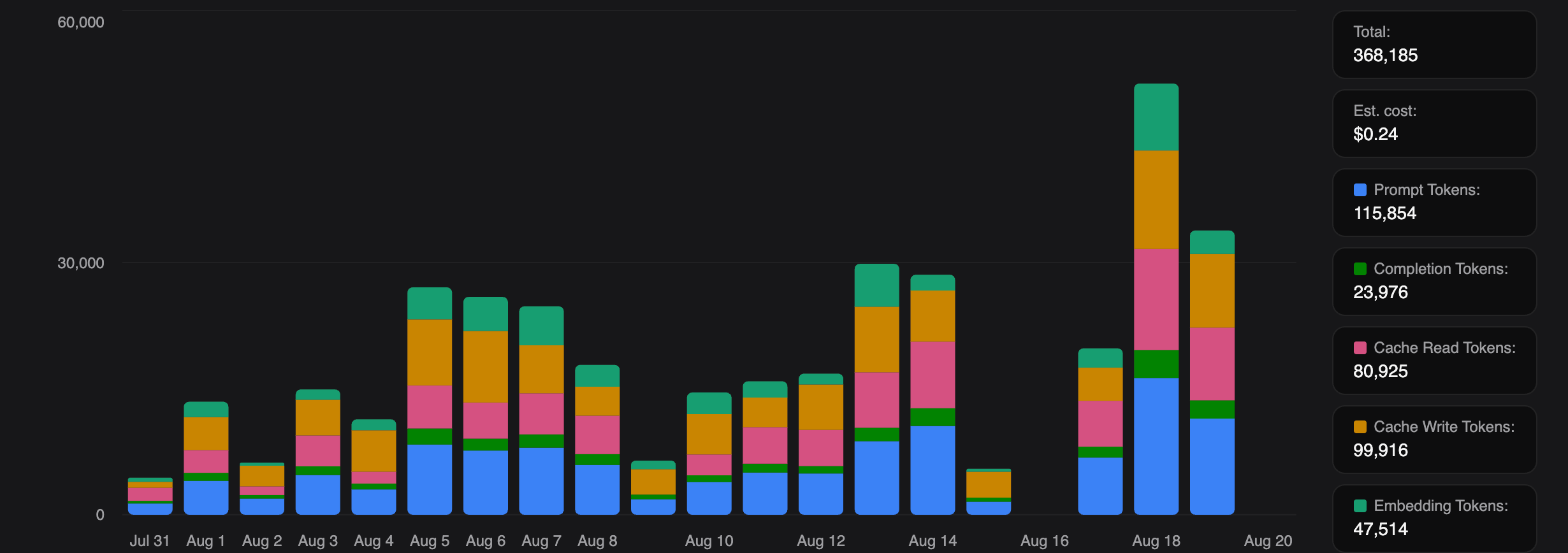
Analytics reports cover production only, by decision, so a load test cannot land in a client’s invoice conversation.
Split it the way you actually bill.
Cost is scoped to an agent and filtered by date range and environment. An agent maps to however you actually split billing, one client with one agent, one client running several, or several clients sharing one, so the number always lines up with the unit you invoice against, with your own test traffic kept out of it.
- Per agentscoped, however many clients it covers
- Per environmentproduction / development
- Per periodany date range
- Client reportsproduction only
- Raw rowsrest api
Cost tracking questions.
Will this match my provider invoice exactly?
It is an estimate, and we call it one. It is computed from the tokens your calls actually reported, priced with published rates on our side, so it tracks the invoice closely and can be restated when a rate changes. It does not know about your committed-spend discounts or credits.
Does it cover providers you don't auto-instrument?
Yes, with one line. OpenAI, Anthropic, LangChain and LlamaIndex are captured with no extra code; anything else goes through wrap() or model_hint() and lands in the same usage rows.
What happens to a model you have no rate for?
It is reported as unpriced rather than as zero, so the gap is visible instead of silently flattering the total. Once the rate is known, the period can be restated.
Can I set a budget or get an alert?
No. There are no budgets, thresholds or alerts today, the product reports spend, it does not police it. We would rather say so than imply a guardrail that isn't there.
Do you read my prompts to work out cost?
No. An LLM span carries token counts and model identifiers only, never prompt or completion text, and you can inspect the exact payload yourself before sending a byte, see security.
Is cost tracking on the free plan?
Yes. The Total Cost card and the Token Usage chart are part of the dashboard, which is free, see pricing.
See what the agent really costs.
- Full dashboard on the free plan
- No card required
- Model spans never carry prompts