

The feature that closes the loop, and the one competitors do not have.
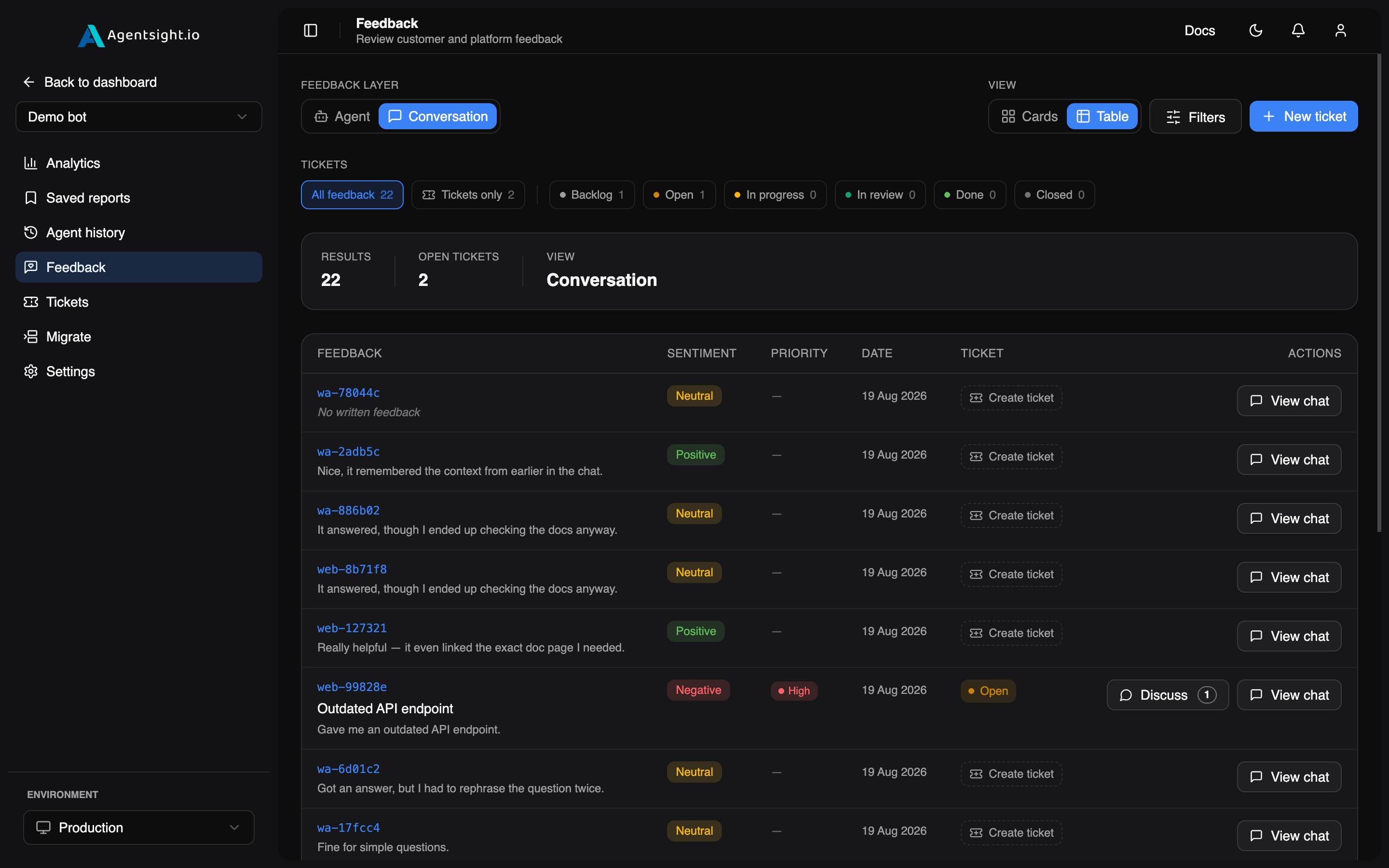
Now it’s a ticket, tied to the exchange.
A ticket in AgentSight is anchored to the conversation, the feedback, or the query it is about. Your client stops describing the problem and starts pointing at it.
Structured blocks render inside the bubble, so an order lookup arrives as an order card rather than a JSON blob, see transcripts.
They find it in the transcript.
Your client reads the conversation the way it happened, messages in order, the tools that produced each answer, their durations and any errors. When something is wrong, it is on the screen in front of them.
This is the third time I've had to explain this, can someone just check order #4471 for me?
Sure, here's the latest on your order:
I already asked this yesterday and got the exact same answer. Here's the screenshot.
Sorry about that, flagging this for a follow-up.
Neither link is required. Together they turn a vague complaint into a specific, reproducible action item.
They open a ticket on that exchange, and it carries its own context.
| Field | Values |
|---|---|
| Status | Backlog · Open · In progress · In review · Done · Closed |
| Priority | Low · Medium · High |
| Tags | free-form labels |
| Environment | where the problem was observed |
| Conversation | the exchange it is about, optional, but the point |
| Feedback | the report that prompted it, optional |
| Discussion | threaded comments, each marked Dev or Reporter |
Months later it is still obvious who was asking and who was answering, without reconstructing it from email and Slack.
You work it out in one thread.
Every comment is marked Dev or Reporter. The client catches what the first fix missed, and that exchange stays attached to the ticket.
Feedback carries a sentiment and a category, scoped to one conversation, the agent overall, or AgentSight itself. Negative feedback promotes into a ticket in a single action.
Client flagged it happened twice more this week, always right after a transfer.
Found it, the summarizer was firing before transfer context got appended. Fix is up in staging.
They confirmed the next three sessions looked clean.
Shipped to production. Closing this out.
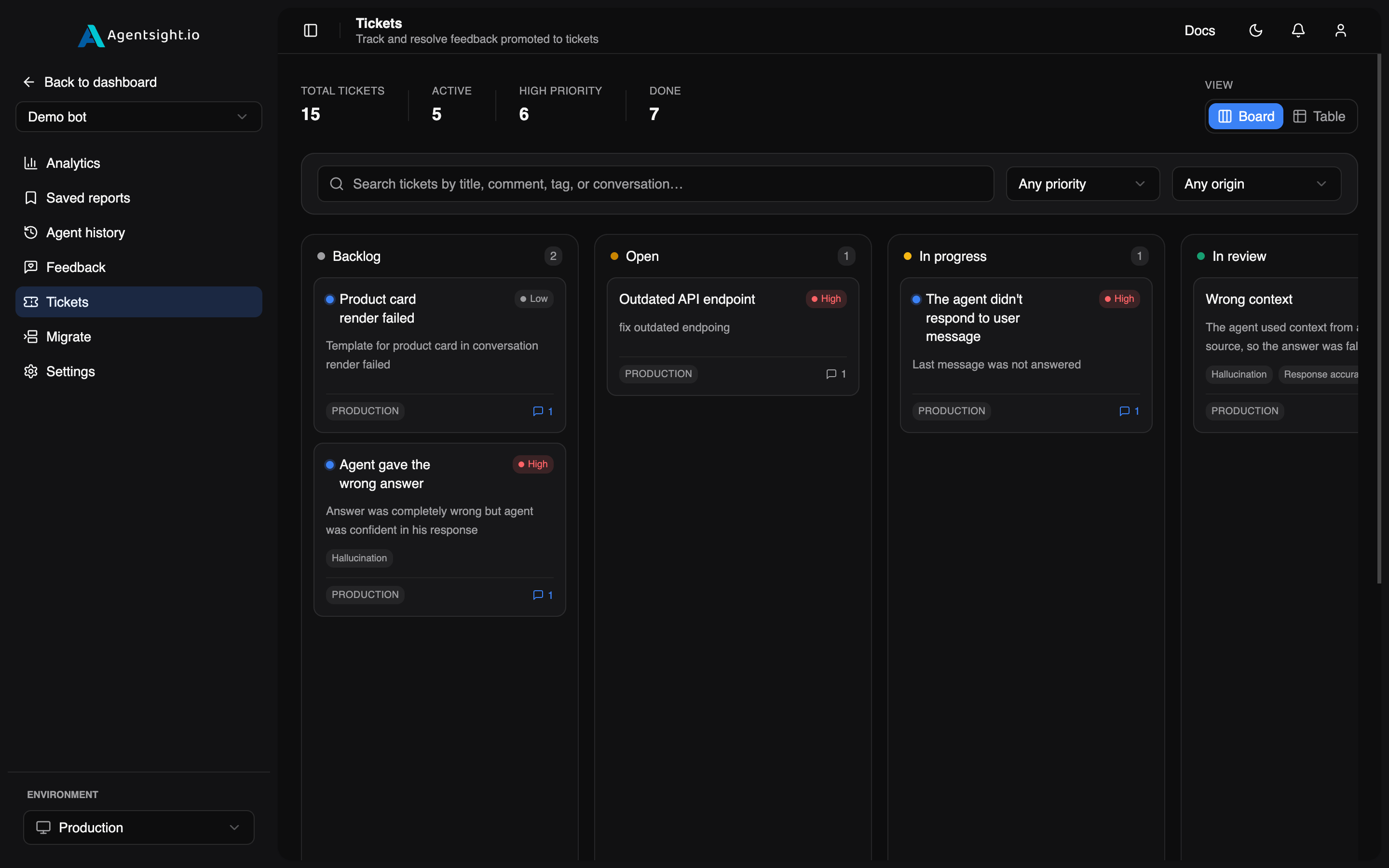
One board. Where your client reaches it depends only on how you handed them the dashboard — subdomain or embed.
Three surfaces, one board.
Every role reaches tickets, Viewer included. Your client signs in and works the board alongside you.
Tickets travel with the white-label dashboard, under your logo and colours, at your own address.
Off by default, existing threads were written when the board was internal-only. Turning it on is a deliberate decision, and tokens can be read-only.
Ticket and feedback questions.
Can our client open tickets, or only read them?
Open them. Tickets are reachable by every role including Viewer, so a client signed in to the dashboard or your subdomain can raise one and comment on it. In the embed you decide: tokens are issued read-only or read-write, so you can show the board without opening it for writes.
How do we find out when they do?
Everyone with access to the agent, the owner and every role holder, gets an in-app notification when a ticket is created and on every comment, deep-linked straight to the ticket. Whoever performed the action is excluded, so you are not notified about your own replies. Tickets raised from inside an embed notify your team the same way.
We already have internal threads on that board. What happens when we hand it to a client?
Nothing, until you decide otherwise. Tickets are off by default in the embed for exactly this reason, the threads already there were written when the board was internal-only. Turning them on is a deliberate "this board is client-safe" decision, not a default you discover after the fact.
Does this replace our issue tracker?
No, and it is not trying to. There is no sync with Jira, Linear or GitHub Issues. This is the board your client works on, where a complaint gets attached to the conversation that caused it, and most teams carry the fix into their own tracker from there.
Is it on the free plan?
Yes, on every tier. Tickets are the reason a client opens the dashboard a second time, and gating the feedback loop would undercut the thing that makes it worth opening at all.
Give your client somewhere to put the complaint.
- Full dashboard on the free plan
- No card required
- Model spans never carry prompts
Pulled the trace for conv_8f2a1c, context resets right after the handoff tool call. Digging in.